Plot 2D
klyn.gui.windows.charts draws scientific curves and scatter plots
directly with the Klyn GUI. Use the same drawing API in an independent window
or inside an existing application, without an external plotting library.
An Independent Window
Create a KlynPlot, add data, then call show().
Construction does not open a window. show() runs the GUI event loop until
the window closes; close() can close it from a GUI callback.
import klyn.math
import klyn.gui.windows.charts

x = NDArray<Double>.linspace(-Math.PI, Math.PI, 1000)
chart = KlynPlot("Trigonometry")
chart.title = "Sine and cosine"
chart.xLabel = "Angle (rad)"
chart.yLabel = "Amplitude"
chart.plot(x, x.sin(), "r:", label="Sine")
chart.plot(x, x.cos(), "g--", label="Cosine")
chart.legend()
chart.grid()
chart.show()
The figure fills the entire window client area, with no outer padding. Space for the title, axes and labels remains inside the figure.
linspace(start, stop, count=50, endpoint=true) creates evenly spaced
samples including both endpoints by default. A single sample equals start.
The count must be positive, consistently with NDArray's non-empty dimensions.
Embed the Same Renderer
KlynPlotWidget is a regular Canvas. Add it to a layout alongside
other widgets. It has the same plotting API as KlynPlot, but does not create
a window or start another event loop.
import klyn.gui.windows
import klyn.gui.windows.layouts
import klyn.gui.windows.charts

window = MainWindow("Experiment")
window.size = (800, 600)
layout = VBoxLayout(0)
window.centralWidget.layout = layout
chart = KlynPlotWidget()
chart.scatter([0.0, 1.0, 2.0], [1.0, 3.0, 2.0], label="Measurements")
chart.legend()
chart.grid()
layout.add(chart)
window.run()
The central container fills the window client area by default, without padding. When embedding a chart in a form, use explicit container margins or padding for the surrounding controls.
Data, Styles and Axes
Both operations accept two one-dimensional NDArray<Double> values
or two IList<Double> lists of equal length. Inputs are copied, so later
mutations do not change an existing series. NaN and infinite coordinate pairs are
omitted; in a curve they also break the line rather than joining across missing data.
plot(x, y, format="", label="", color="", lineWidth=1.5) supports the
short colors b g r c m y k w, line styles - -- -. :, and markers
o . s + x. For example, "r:" is a red dotted line and
"bo-" combines blue circles with a solid line. A marker-only format draws
no connecting line. color accepts Klyn Color's CSS-like color syntax.
scatter(x, y, label="", color="", size=36.0) draws circular markers.
Line widths use points and scatter sizes use square points, at a fixed 100 DPI reference.
Unspecified colors follow a ten-color cycle, separately for curves and scatter plots.
chart.xLim(-4.0, 4.0)
chart.yLim(-1.5, 1.5)
chart.legend("upper left")
chart.grid(false)
chart.autoscale()  # Restore automatic limits with 5% margins.
chart.clear()      # Remove series, reset limits and color cycles.
Manual limits must be finite and increasing. Legends support "best"
(a low-overlap corner), "upper right", "upper left",
"lower right" and "lower left". Empty labels and labels
beginning with an underscore are excluded. legend(visible=false) hides it.
This page covers linear 2D curves. Continue with Scatter 2D or Scatter 3D. Subplots, logarithmic axes and interactive 2D zoom are not yet provided.
Export and Try the Sample
With a Klyn GUI window open, call chart.exportImage(Path("chart.png"), 640, 480)
to export without resizing the widget. Import klyn.io for Path.
PNG, BMP and PDF use the existing Painter export backend. The minimum image size is
240 by 180 pixels; a native GUI display is required.
klyn samples/gui/charts/PlotSample.kn
klyn samples/gui/charts/PlotSample.kn --embedded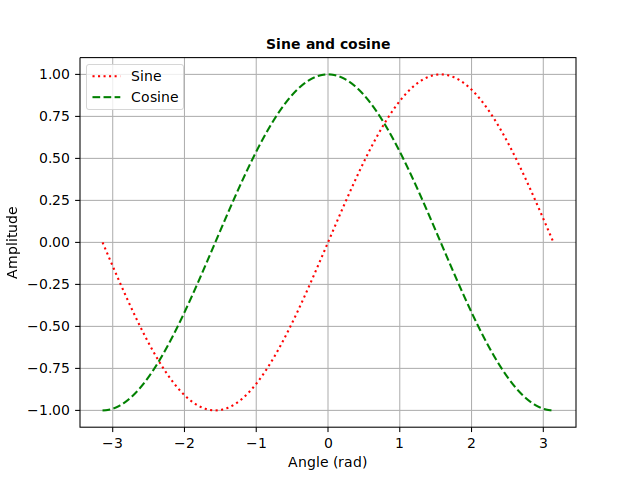
This 640x480 capture was produced on Linux; native font rasterization can differ between operating systems.