Scatter 2D
Show individual observations instead of connecting them with lines. A scatter plot is useful for measurements, correlations and sampled functions.
Sample Two Functions
Ten points are enough to see the difference between the sine and cosine curves.
Each scatter() call adds a series, with its own color and legend label.
import klyn.math
import klyn.gui.windows.charts

x = NDArray<Double>.linspace(-Math.PI, Math.PI, 10)
chart = KlynPlot("2D scatter")
chart.title = "Samples of sine and cosine"
chart.xLabel = "Angle (rad)"
chart.yLabel = "Amplitude"
chart.scatter(x, x.sin(), label="Sine")
chart.scatter(x, x.cos(), label="Cosine")
chart.legend()
chart.grid()
chart.show()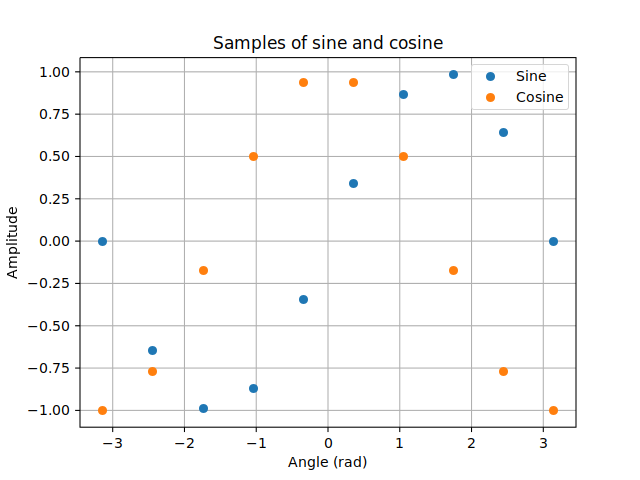
Coordinates and Marker Size
scatter(x, y, label="", color="", size=36.0) accepts two
one-dimensional NDArray<Double> arrays or two IList<Double>
lists of equal length. The chart copies the coordinates. NaN and infinite pairs are
omitted. Invalid lengths and non-finite or non-positive marker sizes raise ValueException.
chart.scatter([1.0, 2.0, 3.0], [2.0, 4.0, 3.0],
              label="Observations", color="#2ca02c", size=64.0)
chart.xLim(0.0, 4.0)
chart.yLim(0.0, 5.0)
chart.legend("upper left")
size is an area in square points, not a radius in pixels.
The renderer uses a 100 DPI reference: doubling the marker diameter means multiplying
size by four. The optional color uses the syntax of Klyn's Color class,
such as hexadecimal or rgba(...).
Curves and scatter series can share the same 2D chart. Each kind maintains its own
color cycle. grid(false) hides the grid; autoscale() restores
automatic limits, and clear() removes all series.
Scalar Colors, Areas and Colorbars
chart = KlynPlotWidget()
chart.scatter(longitudes, latitudes, label="House values",
              values=houseValues, sizes=populationAreas,
              colorMap="coolwarm", vmin=0.0, vmax=5.0,
              sortByValue=true)
chart.colorbar("Median house value (100,000 USD)")
chart.legend()
values and sizes are optional
IList<Double> lists with one entry per coordinate pair.
Scalar values must be finite. Areas must be finite and non-negative;
zero hides a marker. Scalar coloring cannot be combined with a fixed
color. All inputs are copied when adding the series.
The coolwarm palette goes from blue through a light neutral
midpoint to red. Limits default to the scalar minimum and maximum; supplied
vmin and vmax must be finite and non-decreasing.
Values outside them are clamped. Equal limits use the middle color.
sortByValue=true draws low values first without separating
colors, sizes and coordinates; equal values keep their original order.
Colors and optional sorted indices are cached once on insertion, not on repaint.
colorbar(label) uses the most recently added scalar-colored
series' exact palette and limits. Use equal limits on related charts for a
meaningful comparison. colorbar(visible=false) hides it;
clear() clears it along with the plotted data.
To compare observations with predictions, choose shared color limits from the observed targets and reuse them unchanged on both charts. Including prediction outliers in these limits would change the colors of the observed data too. Out-of-range predictions saturate at the palette endpoints; their numeric values and the model's loss are not clipped. Blue and red represent value ranges, not equal-sized groups of observations.
In samples/math/nn/CaliforniaDNN.kn, only the model's input
features are standardized. Geographic coordinates and population areas are
copied before in-place scaling; observed targets and predictions both use
units of 100,000 USD. The chart never receives standardized geography or
a mixture of target units.
Use It in Your GUI
Replace KlynPlot() with KlynPlotWidget() and add it to a
window layout. The drawing API and visual result are the same; only the parent window
runs the event loop. See the embedding example.
With a native GUI window open, chart.exportImage(Path("scatter.png"))
exports a 640x480 image. Import klyn.io for Path.
klyn samples/gui/charts/Scatter2DSample.knAdd a third coordinate to each observation in Scatter 3D.